


Update your Chat Software to version 2.46 and access new features and vocabulary! Let’s go! To update your NovaChat® device, start by connecting to WiFi. Then go to Menu > Help > Check for Updates and follow the prompts. Your overall communication device experience improves with updates too. Go to the settings menu and update today!
Watch the What’s New video to see the highlights for 2.46. Read the details below for more information.
New voices for your NovaChat
Your voice is an important part of your AAC experience. With update 2.46, new voice options are available. Your voice synthesiser is the computer system used to generate your sound.
- There are seven new Acapela voices—six English and one Canadian French
- There are also many inclusive voices from Almagu offering a wide range of voices that are realistic and representative of a variety of age groups: child, teen, adult, and senior
Explore voice options through the settings menu. Choose Menu > Application Settings > Speech Output > Voice > Synthesizer (to pick the synthesizer) or > Voice Settings (to listen to the voices available). Within Voice Settings, you can modify a voice’s pitch and rate of speech. Be sure to save these adjustments to experience them with your selected voice.
More computer control vocab pages available
In the previous Chat Software release 2.45, new button-action pages became available in WordPower® 60 Basic to use your AAC vocabulary as a keyboard with your InputStick. Additional computer control pages are now available for WordPower 60, 80, and 108 as well as MultiChat 15.
You’ll find pages to match your choice of Windows®-based PC, Mac®, or Chromebook™. Launch the COMPUTER CONTROL pages through the “ABC_123” button. Computer control pages for WordPower 140 are in process to make them most efficient for AAC communicators who use the scanning access method.
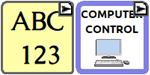
Computer control button actions are now available for customising pages in ChatEditor 2.46. Use this software on your PC to prepare and transfer files for your AAC communicator.
New AAC vocabulary for WordPower
All English WordPower files
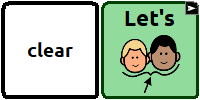
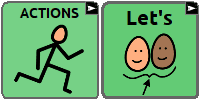
In all English WordPower files, you can now access “Let’s” through the ACTIONS page or by selecting “clear” on the main page.
WordPower 60 Basic, 60, 80, 108 files
The verb “charge” has been added to the main ACTIONS page.
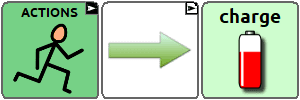
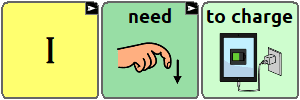
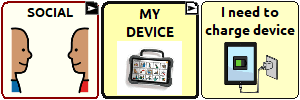
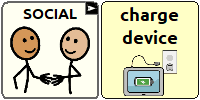
WordPower users can more easily tell you that they need to charge their device. The button to “charge my device” now follows the “I need…” button-action sequence. It can also be found through the SOCIAL page.
A button for “Something hurts” is now available through the “Something’s wrong” page.

All WordPower files 60 and above
Buttons have been added to the BODY page to give AAC users a way to talk about the health and safety of their bodies. Note: pages and buttons may be edited depending on your specific communicator’s needs.

Whiteboard, an app for drawing, collaborating, and sharing, is now available on the GROUPS page as well as within the SCHOOL page.