

It’s time to update your NovaChat® and LR7 devices and access new vocabulary words and features. To update your device, start by connecting to WiFi. Then go to Menu > Help > Check for Updates and follow the prompts.
New Chat Software Features
You can now customise your Chat Software to highlight words in the speech-display bar when they are spoken. This will increase the connection between the written word and the spoken word. Visit the literacy section of the application settings menu to select this new feature; visit the style section to choose your highlight colour.
Watch this video from our colleagues at PRC-Saltillo to see this new feature in action.
Here are your WordPower® vocabulary updates.
All English WordPower files
The Social page now includes a button to let someone know that “something’s wrong.”

All WordPower files (except WordPower 20 Simply)
A button for Microsoft Word is now available on the Writing to Apps page. Activating this button will open Microsoft Word if you have it installed on your device.

Note: if you are on a larger WordPower file, you will not have to select the more groups page.
WordPower 80
Verbs are updated on the main page. A button for the verb “wear” now follows pronoun selection and the verb “wear” now has a link to clothes. Here’s one example.

WordPower 42 Basic, 60 Basic, 80, 108, 140
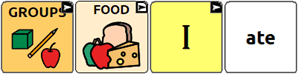
Food and drinks categories are updated with button actions to let you say “I drank” and “I ate.”

WordPower 60 Basic
Check out the actions page to activate the following core verb buttons: choose, fold, hide, hug, kick, pick, and share. The verb melt is now available through the Actions A-Z button.

WordPower 42 Basic
Check out the actions page to activate the following core verb buttons: choose, cut, fold, hug, share, and squeeze. The verbs melt and hide are now available through the Actions A-Z button.

Note: These vocabulary updates are also available on Chat Editor 2.43 so you can create paper-based activities that mirror your device.
Looking for fun and interactive ways to practice vocabulary with your NovaChat device? Check out the AAC Language Lab today. You’ll find real-life solutions in support of language development. Resources include parent guides, sample lesson plans, manual communication boards, and much, much more.
Do you have an especially energetic communicator? NovaChat devices now come with our new Five Year Total Libcare Warranty! Peace of mind meaning you can focus on fun communicating!