


New AAC Vocabulary for WordPower
We are excited to bring you more words to help you say what you want to say . . . in the most efficient way!
WordPower® is known for logical next words and word completion. Some of these additions make words more accessible with less button activations. Many of these changes are in response to your suggestions.
Here’s what you can expect when you open a new English WordPower vocabulary file on your NovaChat® device with update 2025.3 or newer. Remember, you can add new words individually to your customised file or import an entire page with the help of this video tutorial.
WordPower60 Basic
Let’s start with WordPower 60 Basic as this popular file received the most vocabulary changes. Many are available in other button-location options—scroll down the page to find the vocabulary file you use most frequently.
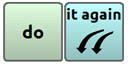
A button for “it again” has been added as a logical next word following “do” on the main page to give you a faster way to say this fun phrase.
Logical next words “the door” and “the book” have been moved to the right of “open” on the main page.
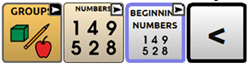
Buttons for “more than” and “less than” signs (> and <) have been added to the “Beginning Numbers” page.
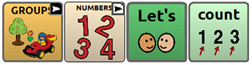
Buttons for “Let’s” and “count” are now available on the NUMBERS1 and “Numbers-simple” pages.
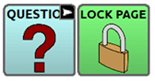
A “LOCK PAGE” button has been added to the “Actions Alone,” ACTION A-Z, DESCRIBE A-Z, and QUESTIONS pages to help you focus on those words.
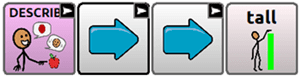
Contrasting adjectives “tall-short” and “more-less” are now available on the DESCRIBE2 page.
“Vroom,” “zoom,” and “beep” are now ready for your playful transportation conversations on the SOCIAL2 page.

The GROUPS-FOOD section has been updated with a button for “take a bite of” so you can more easily say, “I want to take a bite of” a certain food.

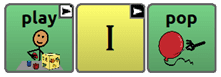
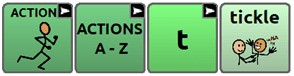
The verb “pop” was added to the “I – PLAY” and “I want like play” pages and the verb “tickle” was added to the ACTIONS-T page.
The verbs “shake” and “spin” are now available on the “I – FEEL” and “I want like feel” pages to help you express sensory needs.

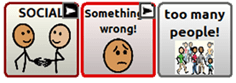
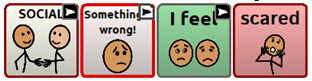
To help you let someone know what’s wrong, a button for “too many people” and “scared” were added to Something wrong1 and Something wrong2 pages respectively.
WordPower42 Basic
There are two changes unique to WP42 Basic.
A second page was added to the SPORTS category.

A combined link to the FOOD & DRINK category was added to the GROUPS page.
The additional new words for WP42 Basic overlap some that were added to WP60 Basic. Scroll up to see the symbols.
- Adjectives “tall-short” are now available on the DESCRIBE3 page
- “Vroom,” “zoom,” and “beep” are now available on the SOCIAL2 page
- The verb “pop” was added to the “I – PLAY” page and the verb “tickle” was added to ACTIONS-T page
- A button for “too many people” and “scared” were added to Something wrong1 and Something wrong2 pages respectively
WordPower42
Here are the new words in WP42. They were also added to WP60 Basic. Scroll up to see the symbols.
- The verb “tickle” was added to the ACTIONS-T page
- A button for “too many people” and “scared” were added to Something wrong1 and Something wrong2 pages respectively
WordPower48 Basic
There are two changes unique to WP48 Basic.
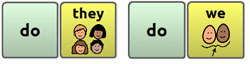
You can now say, “do they” or “do we” on the home page.
Logical next words following “go” have been moved to keep “go” available for a double hit.
The additional new words for WP48 Basic overlap some that were added to WP60 Basic. Scroll up to see the symbols.
- A button for “it again” has been added as a logical next word following “do” on the main page
- Buttons for “more than” and “less than” signs (> and <) have been added to the “Beginning Numbers” page
- A “LOCK PAGE” button has been added to the ACTION A-Z, DESCRIBE A-Z, and QUESTIONS pages
- Adjectives “tall-short” are now available on the DESCRIBE3 page
- “Vroom,” “zoom,” and “beep” are now available on the SOCIAL2 page
- A button for “Let’s count” is now available on the NUMBERS1 and “Numbers-simple” pages
- The verb “pop” was added to the “I – PLAY” and “I want like play” pages and the verb “tickle” was added to ACTIONS-T page
- A button for “too many people” and “scared” were added to Something wrong1 and Something wrong2 pages respectively
WordPower60
Here are the three changes in WP60.
- Adjectives “tall-short” and “more-less are now available on the DESCRIBE2 page.
- The verb “tickle” was added to the ACTIONS-T page
- A button for “too many people” and “scared” were added to Something wrong1 and Something wrong2 pages respectively
WordPower80
The new words in WP80 overlap some that were added to WP60 Basic. Scroll up to see the symbols.
- The “I want like eat” page now has a button for “take a bite of” so you can let someone know “I want to take a bite of” a certain food
- Adjectives “tall-short” are now available on the DESCRIBE2 page
- The verb “tickle” was added to ACTIONS-T page
- A button for “too many people” and “scared” were added to Something wrong1 and Something wrong2 pages respectively
WordPower108 and 108 with Keyboard
Here are the changes in WP108.
- The “I want like eat” page now has a button for “take a bite of” so you can let someone know “I want to take a bite of” a certain food
- Buttons for “Let’s” and “count” are now available on the Math page
- The verb “tickle” was added to the ACTIONS-T page
- A button for “too many people” and “scared” were added to Something wrong1 and Something wrong2 pages respectively
WordPower140
Here are the new words in WP140. Also added in WP60 Basic, scroll up to see the symbols.
- The verb “tickle” was added to the ACTIONS-T page
- A button for “too many people” and “scared” were added to Something wrong1 and Something wrong2 pages respectively
- The adjective “tall” was added to the DESCRIBE page
Note: Images above are from ChatEditor™–a free companion software provided for customising vocabulary on your Windows™ computer. While customising is possible on the device itself, ChatEditor lets you make vocabulary changes when the device is not present. Download it today!