


(This post was originally posted by our colleagues at PRC-Saltillo and has been adapted to include UK links to the items mentioned)
App update 2.52 brings exciting changes to language organisation in TouchChat®, LAMP Words for Life®, and Dialogue® AAC! Your overall app experience improves with updates too. Update today! Watch the What’s New video, from our colleagues at PRC-Saltillo for update highlights. Read the details below for more information.
Language Restructure in All Apps
The 2.52 software update features new ways to interact with your choice of languages. This gives more options to multilingual communicators.
- All supported languages and voices are now included with your app purchase
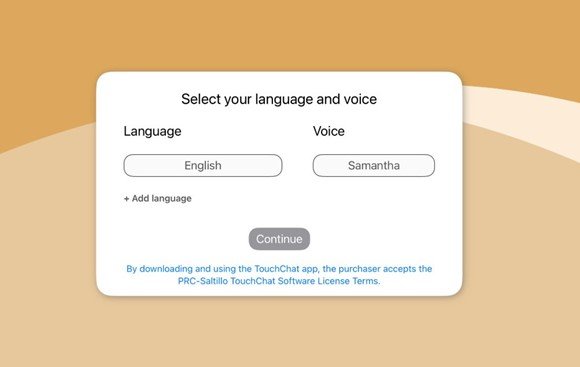
- New customers will start their app experience with a menu to select their preferred languages and voices
- Your app menu will be set up by language first, then vocabulary
- You may update your language at any time
Here’s an example of what appears in TouchChat when new users are getting started.
What language changes are specific to LAMP Words for Life?
Pre-programmed bilingual files (e.g., LAMP WFL – Spanish/English Full) have been removed. Single language files for all our supported languages, English, French Canadian, and Spanish, are now offered for greater flexibility. Vocabulary Builder™ now has separate lists for each language.
Current users
You will still have access to your customised bilingual file. Locate all customized files under ‘My Files’ which is at the top of the Library menu.
New users
You will have access to vocabulary files in a single language, providing more monolingual options. You can create your own bilingual setup using the ‘Go to Vocabulary’ button action to move between languages. An instruction page for how to use “Go to Vocabulary” is provided within the file for easy reference to linking files.
What language changes are specific to TouchChat and Dialogue AAC?
To make a bilingual vocabulary file, pair two files together with the “Go to Vocabulary” button action.
How does this affect voices?
Voices are set up to know the language of the vocabulary file and will switch as you transfer between different language files. The language restructure includes these voice updates:
- Acapela: Lulu is a new adult female Mandarin voice
- Almagu: Improvements to Hebrew and Mandarin voices
To give you the best voice experience, there will be voice limits. When setting up your files for multilingual use, you may choose:
- Up to two Acapela voices
- One Almagu voice
- Unlimited Apple® voices
When you reach the limit of a voice synthesizer, the options for that voice synthesizer will be hidden from the selection list until you unselect the maximum number.
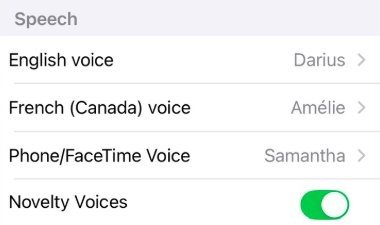
Here’s an example of the updated voice menu for a bilingual English/French communicator.
How does this affect symbols?
Going forward, when you search for symbols, your search will be based on the vocabulary language, not the device language.
New AAC Vocabulary for TouchChat
All WordPower® Files
It’s a new year with growing trends! Check out these new additions to WordPower so your communicators can more easily talk about pop culture.
A button for 2025 has been added to the TIME page.

“Lacrosse” and “pickleball” have been added to the SPORTS page.

“Bluey,” “Paw Patrol,” and “Sponge Bob” have been added to the TV page.

“PlayStation,” “Nintendo,” “Minecraft,” and “Roblox” have been added to the GAMES page.

Several musicians have been added to the MUSIC page.
English files: Beatles, Bruno Mars, Kelly Clarkson, Taylor Swift, Usher

Spanish files: Bruno Mars, Enrique Iglesias, Juan Gabriel, Shakira, Taylor Swift

French files: Beatles, Bruno Mars, Céline Dion, Taylor Swift, Usher

A spelling correction has been made for the DESERT animal “javelina”

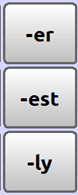
Suffixes for DESCRIBING words, such as -er, -est, and -ly, have been rearranged into vertical alignment
WordPower108 & WordPower120 French
An IMAGINATION page has been added so communicators have vocabulary to talk about magic and fantasy. Words like “fairy” and “monster” will be helpful as you interact with lesson plans in the 2025 Literacy Planner and Calendar.
WordPower60 Mandarin
A “Suggested Settings” page has been added to WordPower Tools to help you experience the best of the new Mandarin/Simplified Chinese vocabulary.
Dates Updated to 2025
Calendar and Time pages have been updated with 2025 in the following vocabulary files:
- myCore
- Communication Journey: Aphasia (all languages/dialects)
- MultiChat15 (all versions)
For help updating your device you can contact our customer support team on 01733 370470 Option 2.