


It’s time to upgrade your Chat Software to version 2.47 and access new features and vocabulary! Your overall communication experience improves with regular updates. Here’s how to make them on your NovaChat®: Connect to WiFi, then go to Menu > Help > Check for Updates and follow the prompts.
Watch the What’s New video to see the highlights for 2.47. Read the details below for more information.
Access Word Finder with locked menus
With update 2.47, communication partners can now access the Word Finder and Guide Me tools even if menus are locked. This will help you more effectively locate and model words with your learner.
New to Word Finder? This button action, labeled Find Word, is located on the ABC_123 page in your WordPower® vocabulary. Word Finder is also accessible through the menu. Watch this tutorial and try it out today!
Check out the reorganised vocabulary file list
Your vocabulary file listing in the menu got a refresh! Vocabulary files that you have customised are now at the top of the list in alphabetical order for easy access. The original files, sometimes locked and noted with a closed lock icon, are now at the bottom of the list in reverse alphabetical order. Less scrolling and more communicating!
Find even more computer control pages
With the latest software update, COMPUTER CONTROL pages in conjunction with the InputStick have expanded for even more vocabularies. Plus a few new updates to make your experience even better as you use your vocabulary as a keyboard and start typing in applications like Microsoft Word, YouTube™, and Google Mail on your computer.
- The full list now includes WordPower® 42, 42 Basic, 48, 60, 60 Basic, 80, and 108 as well as MultiChat 15
- Links to open applications from COMPUTER CONTROL pages are now a single hit using the new delay feature
- You’ll notice a change to symbols on the opening page of COMPUTER CONTROL; previously laptop images, the buttons now reflect the computer type they would like to open—Chromebook™, Windows®-based PC, or Mac®
- Templates are now available with all COMPUTER CONTROL files allowing you to add another app to your device; templates are preprogrammed with the standard function keys that operate the same across apps

Reminder: Computer control button actions became available for customising pages with Chat Editor™ 2.46. Use this software on your PC to prepare and transfer files to your NovaChat. Learn more about Chat Editor and download the newest version.
New AAC vocabulary for WordPower
Make note of these vocabulary updates. Add new words individually to your customised file or import an entire page with the help of this video tutorial.
WordPower 42 Basic
“The book” has been added as a logical next word to the verb “open.”

WordPower 60 Basic
A button for “like” has been added to the “I feel” page so you can more easily say “I feel like.”
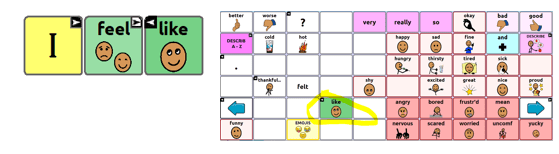
A button for “the book” has been added to follow the verb open.

WordPower 42, 42 Basic, 48
Explore the new COMPUTER CONTROL pages accessible through the “ABC_123” spelling page.
English WordPower 42 to 140
NovaChat communicators can now talk about specific cookies, pies, and cakes as these new buttons have been added to the DESSERT page. Yum!
Introducing Jane’s Place!
Jane’s Place—an online space to exchange implementation resources that support individuals who use AAC—was created to honor Jane Odom’s memory. Jane loved AAC and loved connecting people with AAC resources. We invite you to carry on her legacy here through creative ideas, positivity, and a bit of her trademark playfulness. Learn more about Jane’s Place on the AAC Language Lab.